> ## Documentation Index
> Fetch the complete documentation index at: https://docs.kehillahq.com/llms.txt
> Use this file to discover all available pages before exploring further.
# Yahrzeit settings
> Every setting for the yahrzeit module, and what each one changes.
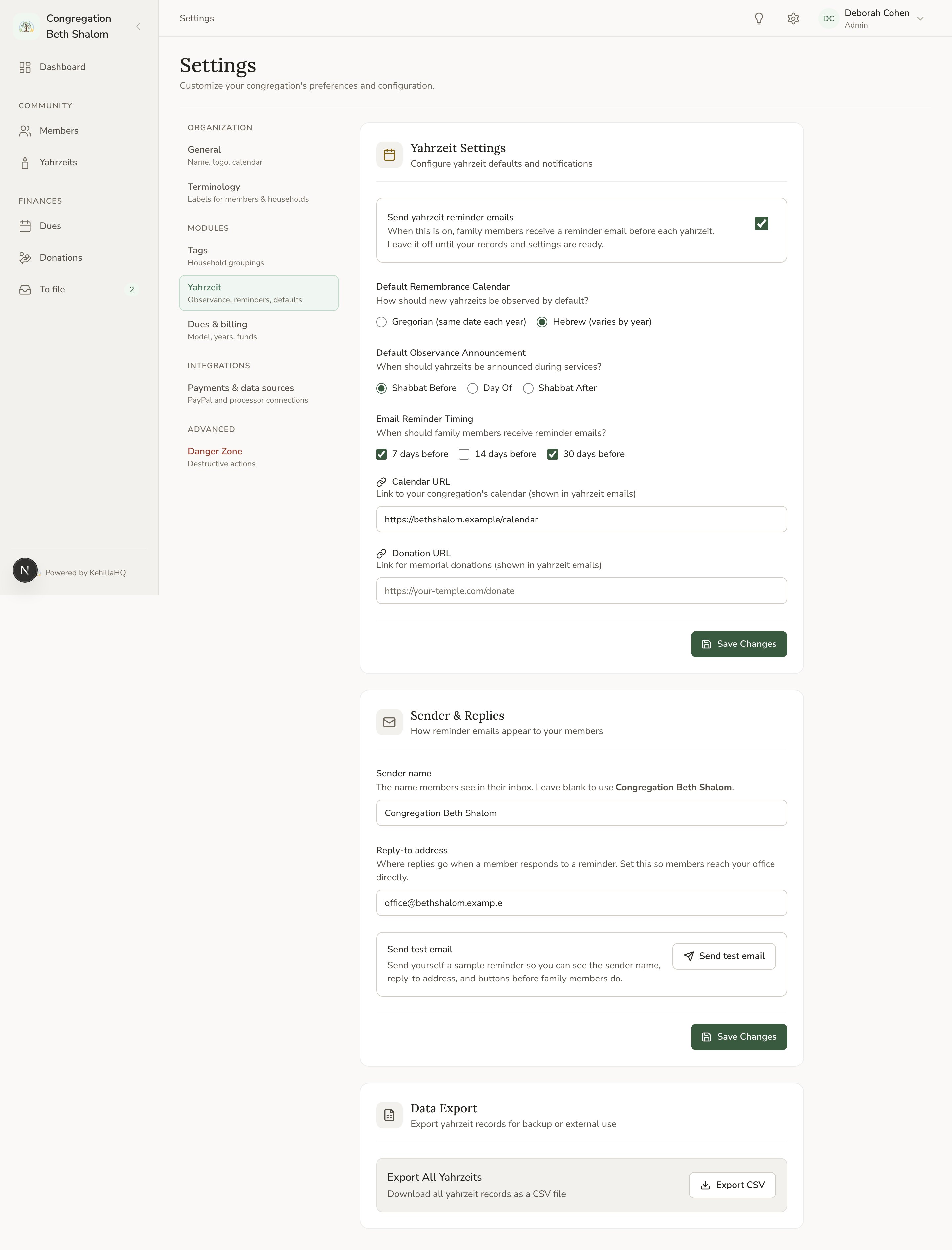
Open **Settings** from the top bar, then choose **Yahrzeit** under Modules. Everything on this page applies to your whole congregation.
 ## Defaults for new records
**Default remembrance calendar** decides whether a new yahrzeit record starts on the Hebrew or the secular calendar. Set it to whichever your community uses most, and you will only change it occasionally when adding a record.
This is a starting point, not a rule. You can change the calendar on any individual record. See [Hebrew and secular dates](/yahrzeits/hebrew-and-secular-dates).
This setting is easy to look for on the General settings page. It lives here instead, with the rest of the yahrzeit module.
**Default observance announcement** decides when your community marks a yahrzeit: on the day itself, the Shabbat before, or the Shabbat after. The default is the Shabbat before. Unlike the calendar default, this one applies to every record and cannot be varied per family. See [When observance falls](/yahrzeits/observance-timing).
## Reminder emails
**Send yahrzeit reminder emails** is the switch for the whole feature. It starts off. Nothing is emailed to anyone until you turn it on.
**Email reminder timing** sets how many days before the observance a reminder goes out. The default is seven days. You can set more than one, for example thirty days and seven days, and each sends once per year per record.
See [Reminder emails](/yahrzeits/reminder-emails) for how the timing actually behaves, including what happens if a day is missed.
## How the emails appear
**Sender name** is the name your members see the email is from. If you leave it empty, your congregation's name is used.
**Reply-to address** is where a reply goes. Set this to an address a person actually reads. Families do reply to these emails, sometimes to correct a detail and sometimes because the reminder has prompted them to get in touch. Those replies should not disappear.
Send yourself a test before switching reminders on for everyone. Look at how the sender name appears in an inbox, and reply to it to confirm the reply lands where you expect.
## Links in the emails
Your congregation can set two optional links that appear in reminder emails:
* A **calendar link**, so a family can check service times
* A **donation link**, for families who mark a yahrzeit by giving
Both are optional. If you have not set one, it is simply left out of the email. There are no empty buttons or dead links.
## Exporting
The settings page also has a **data export** for your yahrzeit records, useful for a backup or for handing your list to someone else.
The export contains: name of the deceased, Hebrew name, date of death, relationship, which calendar the record follows, who is remembering them, their email, and notes.
Exporting requires the export permission, which only the Admin role has. See [Exporting your data](/members/export).
## A sensible order to set these up
Calendar and observance announcement, so new records start right.
Before anything goes out, not after.
Calendar and donation links, if you want them.
Seven days is a good starting point.
Filter by **No email** and fix what you can.
Last, deliberately.
## Defaults for new records
**Default remembrance calendar** decides whether a new yahrzeit record starts on the Hebrew or the secular calendar. Set it to whichever your community uses most, and you will only change it occasionally when adding a record.
This is a starting point, not a rule. You can change the calendar on any individual record. See [Hebrew and secular dates](/yahrzeits/hebrew-and-secular-dates).
This setting is easy to look for on the General settings page. It lives here instead, with the rest of the yahrzeit module.
**Default observance announcement** decides when your community marks a yahrzeit: on the day itself, the Shabbat before, or the Shabbat after. The default is the Shabbat before. Unlike the calendar default, this one applies to every record and cannot be varied per family. See [When observance falls](/yahrzeits/observance-timing).
## Reminder emails
**Send yahrzeit reminder emails** is the switch for the whole feature. It starts off. Nothing is emailed to anyone until you turn it on.
**Email reminder timing** sets how many days before the observance a reminder goes out. The default is seven days. You can set more than one, for example thirty days and seven days, and each sends once per year per record.
See [Reminder emails](/yahrzeits/reminder-emails) for how the timing actually behaves, including what happens if a day is missed.
## How the emails appear
**Sender name** is the name your members see the email is from. If you leave it empty, your congregation's name is used.
**Reply-to address** is where a reply goes. Set this to an address a person actually reads. Families do reply to these emails, sometimes to correct a detail and sometimes because the reminder has prompted them to get in touch. Those replies should not disappear.
Send yourself a test before switching reminders on for everyone. Look at how the sender name appears in an inbox, and reply to it to confirm the reply lands where you expect.
## Links in the emails
Your congregation can set two optional links that appear in reminder emails:
* A **calendar link**, so a family can check service times
* A **donation link**, for families who mark a yahrzeit by giving
Both are optional. If you have not set one, it is simply left out of the email. There are no empty buttons or dead links.
## Exporting
The settings page also has a **data export** for your yahrzeit records, useful for a backup or for handing your list to someone else.
The export contains: name of the deceased, Hebrew name, date of death, relationship, which calendar the record follows, who is remembering them, their email, and notes.
Exporting requires the export permission, which only the Admin role has. See [Exporting your data](/members/export).
## A sensible order to set these up
Calendar and observance announcement, so new records start right.
Before anything goes out, not after.
Calendar and donation links, if you want them.
Seven days is a good starting point.
Filter by **No email** and fix what you can.
Last, deliberately.