> ## Documentation Index
> Fetch the complete documentation index at: https://docs.kehillahq.com/llms.txt
> Use this file to discover all available pages before exploring further.
# How dues years work
> When your year starts, what a year is called, and why 2025 to 26 is called 2026.
Congregations rarely run their finances on the calendar year. Most run September to August, following the Hebrew year and the school year. KehillaHQ works the same way.
## Setting your year start
In **Settings**, then **Dues and billing**, choose the month your dues year starts. The default is **September**.
Everything else follows from that. Set it once, at the start, and leave it.
Set this before you record commitments. Changing it later changes which year existing records fall into, which is confusing to unpick. If you are not sure what your congregation uses, check with your treasurer before entering anything.
## What a year is called
A dues year is named for the year it **ends** in.
With a September start, the year running **September 2025 to August 2026** is the **2026** dues year.
This trips people up at first, so it is worth sitting with. In autumn 2025 you will be working in the "2026" year. That is correct. The convention matches how a school year ending in June 2026 is called the 2026 year, and it means each year has one unambiguous name rather than depending on which end you say first.
If your year start is January, the dues year is simply the calendar year.
## What you see on screen
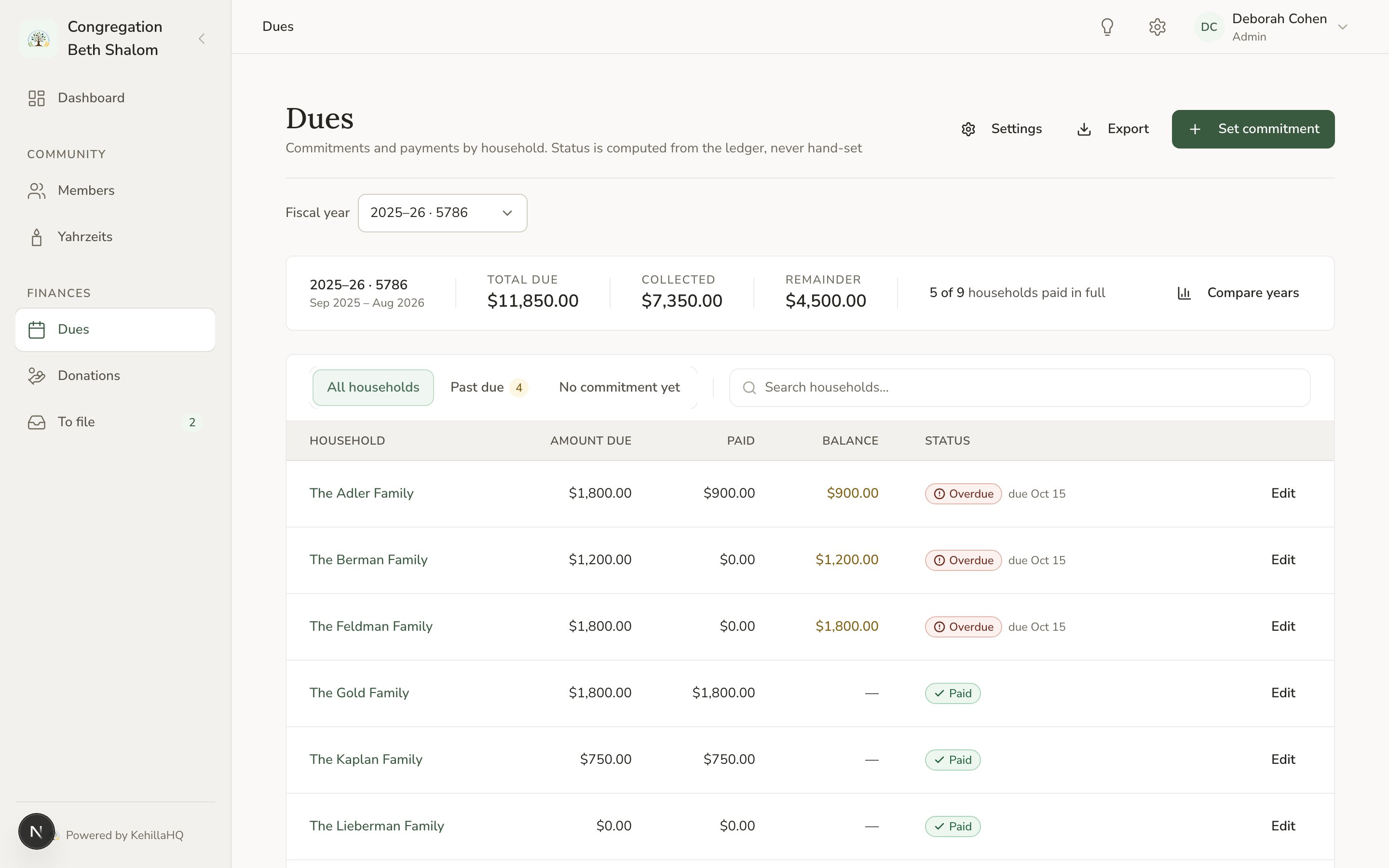
The finance pages show both calendars:
```
2025–26 · 5786
```
The civil span comes first, because that is what a treasurer reads first, and the Hebrew year follows, because that is how many congregations name their year.
Where the boundaries could be ambiguous, the year is spelled out in full: **Sep 2025 to Aug 2026**.
 ## Moving between years
The year selector on the Dues page switches which year you are looking at. It changes the totals, the commitments, and the household list all together.
You can work in a past year to catch up on records, and in a future year to enter commitments in advance. The year picker offers every year a household has committed to, plus last year, this year, and next year, so you are never blocked from getting ahead or catching up.
## Due dates
Your congregation can set an annual due date, a month and a day, in the same settings page. It is used to pre-fill the due date on new commitments.
Two details worth knowing:
**The day is clamped to the month.** If you set the 31st, February uses the 28th, or the 29th in a leap year. You can safely use the 31st to mean "the end of the month".
**Changing the setting never rewrites history.** A commitment already recorded keeps the due date it was given. So adjusting your due date this year cannot retroactively make last year's records overdue.
## What Overdue means
A commitment is **Overdue** once the date is strictly past. The due date itself is not overdue: a payment arriving on the due date is on time.
Voluntary pledges are never overdue. See [Choosing a dues model](/finances/dues-models).
## Which households appear
A household appears on a dues year's list if it had joined by the end of that year. It does not appear on years that finished before it joined.
This has a few consequences worth understanding properly. See [Households that join mid-year](/finances/mid-year-joins).
## Moving between years
The year selector on the Dues page switches which year you are looking at. It changes the totals, the commitments, and the household list all together.
You can work in a past year to catch up on records, and in a future year to enter commitments in advance. The year picker offers every year a household has committed to, plus last year, this year, and next year, so you are never blocked from getting ahead or catching up.
## Due dates
Your congregation can set an annual due date, a month and a day, in the same settings page. It is used to pre-fill the due date on new commitments.
Two details worth knowing:
**The day is clamped to the month.** If you set the 31st, February uses the 28th, or the 29th in a leap year. You can safely use the 31st to mean "the end of the month".
**Changing the setting never rewrites history.** A commitment already recorded keeps the due date it was given. So adjusting your due date this year cannot retroactively make last year's records overdue.
## What Overdue means
A commitment is **Overdue** once the date is strictly past. The due date itself is not overdue: a payment arriving on the due date is on time.
Voluntary pledges are never overdue. See [Choosing a dues model](/finances/dues-models).
## Which households appear
A household appears on a dues year's list if it had joined by the end of that year. It does not appear on years that finished before it joined.
This has a few consequences worth understanding properly. See [Households that join mid-year](/finances/mid-year-joins).