> ## Documentation Index
> Fetch the complete documentation index at: https://docs.kehillahq.com/llms.txt
> Use this file to discover all available pages before exploring further.
# Donations and the contributions ledger
> Every payment your congregation has recorded, in one list.
The **Donations** page is your full ledger: every contribution recorded, whatever it was for and however it arrived.
Dues payments, fund donations, cash in an envelope, a PayPal gift filed last Tuesday. All of it, newest first.
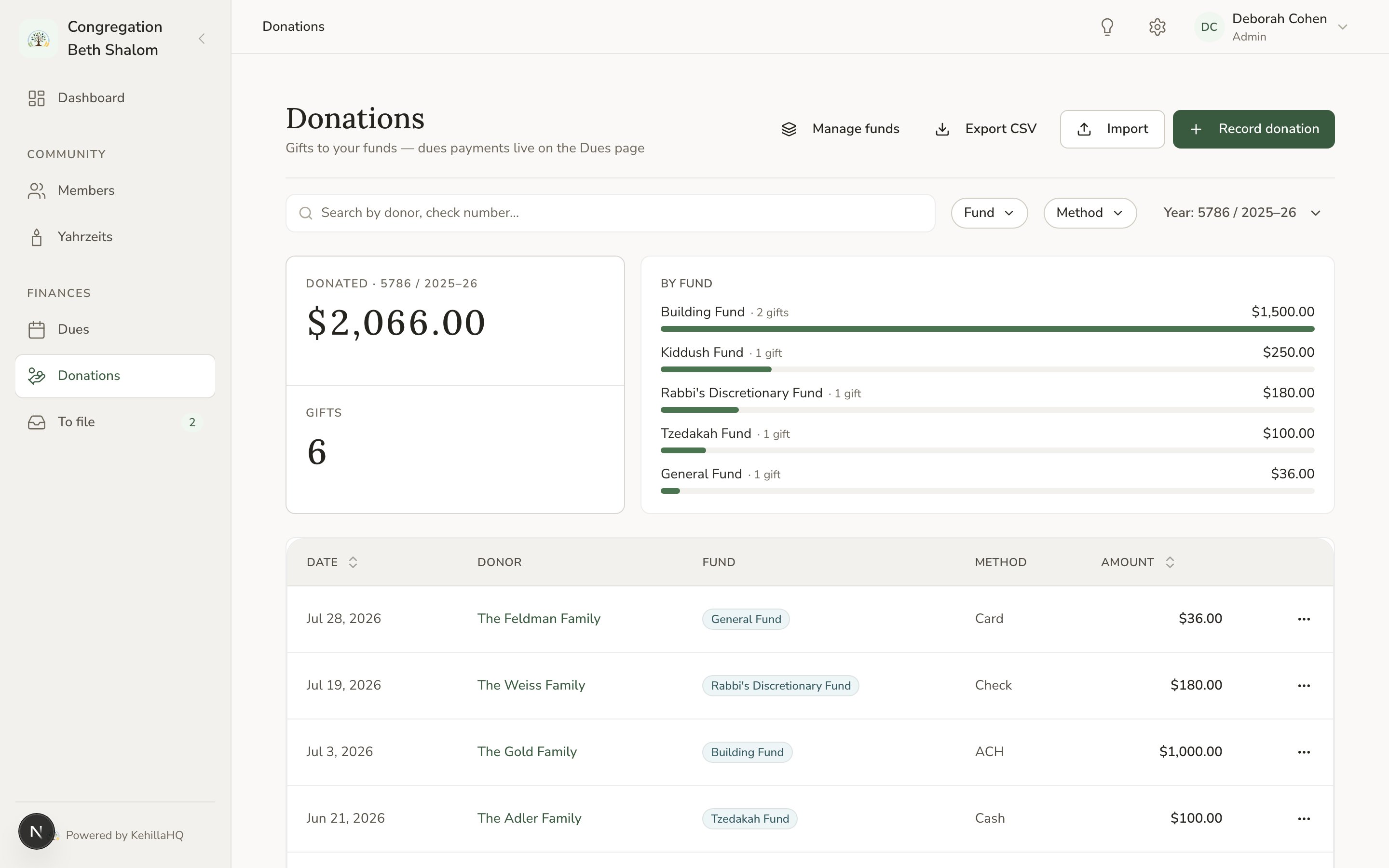 ## What each row shows
The date received, the amount, who it came from, what it was for, and how it was paid.
Amounts line up on the right in a consistent style, so a column of figures can be scanned and compared. Payment methods are written properly, so ACH reads as ACH rather than Ach.
## Filtering
Filter by date range, by fund, by household, and by payment method.
Filters go into the page address, so a view you use often can be bookmarked and reopened filtered. Sharing the link gives a colleague the same view, if their role allows it.
Some useful combinations:
* **One fund, one dues year** answers "how did the building fund do last year".
* **One household, all dates** is that family's complete giving history.
* **Payment method Cheque, last month** is a reconciliation aid.
## Recording, editing, and removing
Record a contribution from here. See [Recording a payment](/finances/record-a-payment).
Open any row to edit it. Editing is the right way to fix a payment recorded against the wrong household, the wrong fund, or the wrong year.
Deleting is for entries that should never have existed. There is no void or refund flow, so a refunded payment is better recorded as a separate offsetting entry, which leaves the history telling the true story.
## Reading the ledger against your dues page
A contribution appears here whether or not it is linked to a dues commitment. That is the point of a ledger: it records what arrived.
But **only payments linked to a commitment count toward dues**. So the two pages can disagree, and when they do it usually means something is unlinked.
If a household says it has paid and the Dues page still shows a balance:
Filter by that household.
If it is linked to a fund, or to nothing, that is your answer.
Link it to the right dues commitment, for the right year.
## Statements for families
Filtering to one household gives you their giving history for a year, which is what you need when a family asks for a record of their contributions.
Tax receipts and formal acknowledgement letters are not generated for you. Use the filtered ledger as the source and produce the letter in your own words. Rules about what a receipt must say vary by country, so check yours.
## Who can see this page
Admin and Financial Admin can view and record. Board Member can view but not change. Clergy, Staff, and Volunteer have no access. See [Roles and permissions](/get-started/roles).
## What each row shows
The date received, the amount, who it came from, what it was for, and how it was paid.
Amounts line up on the right in a consistent style, so a column of figures can be scanned and compared. Payment methods are written properly, so ACH reads as ACH rather than Ach.
## Filtering
Filter by date range, by fund, by household, and by payment method.
Filters go into the page address, so a view you use often can be bookmarked and reopened filtered. Sharing the link gives a colleague the same view, if their role allows it.
Some useful combinations:
* **One fund, one dues year** answers "how did the building fund do last year".
* **One household, all dates** is that family's complete giving history.
* **Payment method Cheque, last month** is a reconciliation aid.
## Recording, editing, and removing
Record a contribution from here. See [Recording a payment](/finances/record-a-payment).
Open any row to edit it. Editing is the right way to fix a payment recorded against the wrong household, the wrong fund, or the wrong year.
Deleting is for entries that should never have existed. There is no void or refund flow, so a refunded payment is better recorded as a separate offsetting entry, which leaves the history telling the true story.
## Reading the ledger against your dues page
A contribution appears here whether or not it is linked to a dues commitment. That is the point of a ledger: it records what arrived.
But **only payments linked to a commitment count toward dues**. So the two pages can disagree, and when they do it usually means something is unlinked.
If a household says it has paid and the Dues page still shows a balance:
Filter by that household.
If it is linked to a fund, or to nothing, that is your answer.
Link it to the right dues commitment, for the right year.
## Statements for families
Filtering to one household gives you their giving history for a year, which is what you need when a family asks for a record of their contributions.
Tax receipts and formal acknowledgement letters are not generated for you. Use the filtered ledger as the source and produce the letter in your own words. Rules about what a receipt must say vary by country, so check yours.
## Who can see this page
Admin and Financial Admin can view and record. Board Member can view but not change. Clergy, Staff, and Volunteer have no access. See [Roles and permissions](/get-started/roles).